Building an Opportunity: Custom Content Integrations for Any System
How opportunities reach BeLazy: connectors and workspaces
BeLazy takes in localization projects two ways.
Connectors: Connectors are built and owned by BeLazy. Connectors synchronize on their own with external systems such as TMSes, vendor portals and CMSes, authenticating, reading the available information and creating opportunities. Connectors appear as blue cards under Connections in the BeLazy user interface. You can find detailed information about connectors in the user documentation. This guide applies exclusively to workspaces.
Workspaces: If you want to extend BeLazy's connection capabilities, you use workspaces to create opportunities via BeLazy's API. You can upload files and associate each one with the workspace. When you add files to the workspace, you set each file's role (source file, reference file, etc.), and get back the file IDs that we will refer to in this guide. Once the files are added to the workspace, you create the opportunity from the workspace. Each workspace shows up as a magenta card under Connections in the user interface.
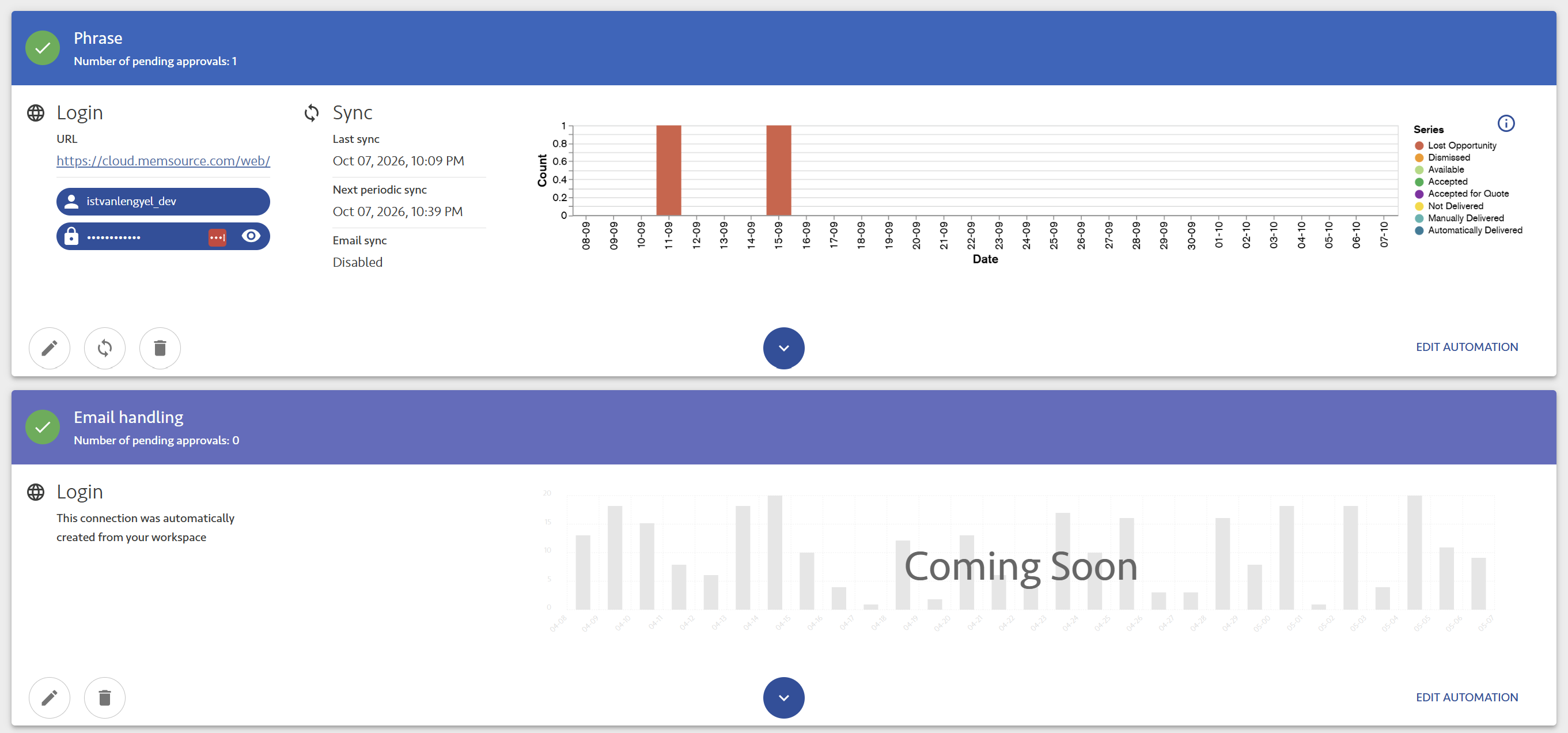
Workspace-based connections are also used in BeLazy itself: BeLazy's own (customer) portal is a full implementation of this documented API, and BeLazy's Email Assistant is built on the same calls to turn a parsed email into an opportunity. Workspaces can describe a project just as fully as connectors can.
The Project Ingestion API is BeLazy's entry point: you can describe all project information to BeLazy using only these calls. It's a large, versatile, genuinely powerful API, and this is why we decided that it deserves its own dedicated description page. Through a workspace, you can wire in a project or a piece of content from essentially any source that can hand off files and metadata: a TMS, a vendor portal, an email inbox, a ticketing or project management system, a product information management system, an internal database, or any other system. An opportunity doesn't even have to carry files: you can create one from a templated email that already states the price and assignments, while the work itself happens in a third-party system. A custom TMS integration can have vendors working directly inside the TMS that talks to this API, so the files never leave the environment. The opportunity in this case only carries the link, the quantities, and possibly the price. Multimedia, transcription, and interpreting projects are often priced by the hour, minute, or session, with no document to process at all. Question 1 covers these file-less shapes. The Create opportunity from workspace API call has one comprehensive payload. Depending on your answers to the different questions, you fill in different parts, and based on whether you have analysis and pricing, you trigger more or less processing in other systems (TMS and BMS) afterwards.
This guide explains how you can create a payload that covers your specific integration case. You build up the payload by making a few decisions, one per question. Each section explains what to do for each possible answer.
First, four terms
-
Opportunity: the payload itself, the information a source system knows about one piece of work.
-
BeLazy project: what the opportunity becomes once it's accepted in BeLazy. Accepting turns the opportunity into a project. Each accepted opportunity produces exactly one BeLazy project, with one source language and one or more target languages.
-
Pricing item: the atomic unit of work inside a project, one file crossed with one workflow step crossed with one language, or a non-linguistic line like DTP or project management. It's the unit of pricing, the unit of assignment, and the unit of delivery, all three at once.
-
TMS project: in the context of this guide, a TMS project is always a project that BeLazy itself creates and manages inside a TMS, built from the source files you attach to the opportunity. Having BeLazy create the TMS project is normally how you get an analysis if you don't already have one. Only Source and Bilingual files become part of the TMS project, and you should attach them at the pricing-item level. Reference files are never imported into the TMS project.
Note: BeLazy can also pick up projects that already exist in a TMS. If your system already sends work to a TMS that has a supported integration in BeLazy's Content and Project Hub, BeLazy picks the projects up from there through its connector, and you don't need a separate integration through this API. There are two ways you can use this API. First, you can build integrations that don't exist yet, extending the systems that BeLazy, and through it your TMS, can connect to. Second, if you maintain your own connectors to one or more TMSes, you can replace them with a single integration through this API and let BeLazy handle the TMS side. This makes your integration simpler and easier to maintain over time.
If you are integrating a TMS that is not currently supported by BeLazy, see Question 2.
The processing pipeline for the payload

Answer the following questions to build a payload that allows you to process your projects as part of this pipeline. The opportunity carries the content into BeLazy, and accepting it creates a BeLazy project. A TMS then produces the analysis and quantity: Question 2 decides whether BeLazy creates that TMS project for you, and Question 4 covers what the analysis contains. Finally, a BMS (or BeLazy's Google Sheet tool) turns analysis and quantity into pricing, unless you state the price directly on the pricing item, which is what Question 5 decides.
Question 1: Do you have files to attach right now?
If no, skip to Question 3. Plenty of opportunities never carry a file, for various reasons:
-
Templated email intake: an email notification coming from your client with detailed project and financial information, a TMS notification, or a standing weekly job already contains the price and the assignments. The content is in another system that the email references. No attachment is needed.
-
Custom TMS integration, where files never leave the TMS: vendors work directly inside a TMS that talks to this API on its own connection, so the opportunity carries a
link, the analysis, and possibly the price, and the files stay in the TMS. -
Multimedia, transcription, and interpreting work: audio and video localization, transcription, and interpreting sessions are usually priced and assigned with no file at all. The deliverable is a recording or a live session rather than a document.
-
Spreadsheets received from customers: sometimes your customer keeps a log of the work you did for them, and shares that with you at the end of the month. You need to import this into your own database to be able to pay your vendors.
All four opportunity types can still use the fields covered in Questions 3 through 5 (workflow, quantity and price); they just skip files and TMS-project creation.
If you have files, decide where they go. Files belong in two possible places:
-
Project-level
fileIds(top of the payload): these files are attached to the opportunity as a whole rather than to one language. This covers reference material like a style guide or a brief, but also a real deliverable, an image that needs localizing, for example, that should reach every language without a TMS project being built from it. -
Pricing-item-level
fileIds: the file BeLazy actually processes in the connected TMS.
A file at the project level never becomes part of a TMS project, but it isn't inert either: BeLazy still uploads it to the BMS job or BMS project, as the BMS allows it. You should use this pattern for something like an image that needs localizing in each language, but cannot be imported into a TMS.
Rule of thumb: putting a file's fileIds at the pricing-item level always works, whether or not you end up wanting a TMS project built from it. Reserve project-level fileIds for material that should genuinely stay out of any TMS project, pure reference files like a style guide or a brief.
The snippet below shows the simplest example that uses only the project level: a brochure and a spec sheet attached to the whole opportunity, going from English into German, French, and Spanish, with no pricing items at all. It illustrates what the project level alone gets you. Add the empty pricing items with the target languages (see below), and both files will reach the BMS job for every target language, but since no pricing item references them, BeLazy creates no TMS project from them.
{
    "workspaceId": "WORKSPACE_ID",
    "fileIds": ["FILE_ID_BROCHURE", "FILE_ID_SPECSHEET"],
    "properties": {
        "name": "Product brochure EN > DE, FR, ES",
        "sourceLanguage": "eng-usa",
        "targetLanguages": ["deu-deu", "fra-fra", "spa-esp"],
        "contactPerson": { "firstName": "Juan", "lastName": "Garcia", "email": "juan.garcia@example.com" }
    }
}
We do not know anything about the price here, but we still recommend adding placeholder pricing items that refer only to the target languages, instead of leaving pricing out. If you do not create pricing items at all, not every BMS will create a correct project for you.
"pricing": {
    "pricingItems": [
        { "targetLanguage": "deu-deu" },
        { "targetLanguage": "fra-fra" },
        { "targetLanguage": "spa-esp" }
    ]
}
Question 2: Should BeLazy create a TMS project from these files?
BeLazy differentiates between two directions of integration when it comes to TMSes. First, if the work already exists in a TMS, whether that's the customer's TMS or yours, BeLazy can pick that project up and refers to it with a link at the project level or at the pricing-item level. You can implement vendor assignment and mapping or bidirectional job status synchronization using the pricing items. Customers have used this API to integrate their own custom-built TMSes, as well as less common but API-capable ones. For example, Termbase.io and Robert are two TMSes integrated this way. Second, if all you have is source files and you want an analysis, you'll most likely need BeLazy to import them into a TMS and create a project there for you. That is how an analysis normally gets generated in the first place.
The rest of this section covers the second path.
The rule: only Source and Bilingual files become part of the TMS project (this is set up when you add the file to the workspace and specify its type), and each one must be referenced inside a pricing item's own fileIds. If you attach several translatable files and any of them sits only at the project level, BeLazy creates no TMS project at all, not even from the files the pricing items do reference.
The practical consequence: for content you want turned into TMS jobs, plan on one pricing item per file, each carrying that file's own fileIds. targetLanguage and fileIds are enough. totalQuantity and unit default silently if you skip them (see Question 4), but if you already have them, supply the actual quantity, and an analysis too. Non-linguistic lines, desktop publishing by the page, a flat project-management fee, don't need fileIds at all, since there's nothing to import for them.
"fileIds": ["FILE_ID_HELP_JA", "FILE_ID_HELP_KO"],
"properties": {
    "pricing": {
        "pricingItems": [
            {
                "name": "help_72_ja.xlf",
                "targetLanguage": "jpn-jpn",
                "fileIds": ["FILE_ID_HELP_JA"]
            },
            {
                "name": "help_72_ko.xlf",
                "targetLanguage": "kor-kor",
                "fileIds": ["FILE_ID_HELP_KO"]
            }
        ]
    }
}
Each language gets its own file and its own pricing item, because each language needs its own TMS representation built from the right source. When several files feed a single language pair, you need a pricing item for each file.
The same file ID can repeat across several pricing items. If you translate the same monolingual DOCX file into three languages, the same fileIds value goes on all three pricing items. The TMS project is created for three languages from the same file. In the case of a bilingual format like XLIFF, each language's export is already a distinct file, so each pricing item naturally gets its own file ID.
Only source files and bilingual documents can become part of a TMS project. A file with the reference role never does, whether you attach it at the project level or to a pricing item. Where you attach it only affects which BMS jobs receive it: a general style guide at the project level reaches every target language, while a language-pair-specific style guide attached to a pricing item reaches only the job for that item's target language. Some BMSes store files once for the whole project rather than per language, and there the distinction disappears.
Warning: if you add a single source file to be shared across several target languages on the project level, without pricing items explicitly referencing it, BeLazy won't create a TMS project from it.
Note: for most CMS integrations, you only need what we've covered so far. Continue to Question 3 if you need a multi-step workflow, and only deal with Questions 4 and 5 if you have a way to scope and price the content.
Question 3: Does this work have more than one workflow step?
This depends more on the source system you are integrating than on the content. For example, job tracker integrations, delivering per-card status on a kanban board, and TMS integrations commonly use multiple steps, translation then review, matching stages that the tool already tracks. Most content management integrations don't need more than one step, unless you want, for example, an automatically translated version published first, then overwritten later by a manually reviewed one.
A single-step workflow ("workflowSteps": ["Translation"]) needs nothing extra on each pricing item. The moment you declare two or more steps, every pricing item must say which step it belongs to via workflowStep.indexInWorkflow, zero-based.
"originWorkflow": { "workflowSteps": ["Translation", "Review"] },
"pricing": {
    "currency": "EUR",
    "pricingItems": [
        { "targetLanguage": "fra-fra", "unitPrice": 0.14, "workflowStep": { "indexInWorkflow": 0 } },
        { "targetLanguage": "fra-fra", "unitPrice": 0.05, "workflowStep": { "indexInWorkflow": 1 } },
        { "targetLanguage": "deu-deu", "unitPrice": 0.14, "workflowStep": { "indexInWorkflow": 0 } },
        { "targetLanguage": "deu-deu", "unitPrice": 0.05, "workflowStep": { "indexInWorkflow": 1 } }
    ]
}
The number of pricing items can be high in a multi-step integration: files × workflow steps × languages, plus any flat non-linguistic lines. Two languages, two steps and two files are already eight pricing items, before adding any surcharge or non-linguistic fee.
The index marks the step, so it repeats across every file and every language sitting at that same step. Two French files and two Spanish files all in translation are four pricing items, all carrying indexInWorkflow: 0. The index stays the same, while targetLanguage and fileIds may differ. If you are working on the same file in the TMS in multiple workflow steps, put the same fileId into the pricing items belonging to every workflow step - for example, you should repeat the same fileId both in the Translation and the Review steps.
"pricing": {
    "pricingItems": [
        { "name": "brochure-1.docx", "targetLanguage": "fra-fra", "fileIds": ["FILE_ID_FR_1"], "workflowStep": { "indexInWorkflow": 0 } },
        { "name": "brochure-2.docx", "targetLanguage": "fra-fra", "fileIds": ["FILE_ID_FR_2"], "workflowStep": { "indexInWorkflow": 0 } },
        { "name": "brochure-1.docx", "targetLanguage": "spa-esp", "fileIds": ["FILE_ID_ES_1"], "workflowStep": { "indexInWorkflow": 0 } },
        { "name": "brochure-2.docx", "targetLanguage": "spa-esp", "fileIds": ["FILE_ID_ES_2"], "workflowStep": { "indexInWorkflow": 0 } }
    ]
}
You can declare a multi-step workflow while only pricing the first step now. It's valid to list ["Translation", "Review"] and submit pricing items for index 0 alone; the review step's pricing can be added later, once it's known.
A per-item deadline overrides the project deadline for that pricing item (it becomes the workflow step deadline). This is how you can schedule multi-step deliveries or per-language deliveries. The project deadline should be the last deadline.
Question 4: What do you already know about quantity?
Quantities are optional in the description of an opportunity. targetLanguage is the only field a pricing item actually can't do without, but if you have information about the quantities, add weightedQuantity, totalQuantity and unit.
So how much do you know about quantity?
-
Nothing at all: use only the placeholder pricing items from Question 1. Quantity arrives later, calculated by the TMS once the files are imported and analysed there.
-
A single total count: add
totalQuantitywith a plainunit(Word,Page,Hour,Flat), without a fuzzy breakdown. You can use the flat count to add anything already counted outside a TMS, like hours of review, pages of desktop publishing, minutes of subtitling, or the total word count of a software resource file. -
A full analysis: an
analysisarray breakingtotalQuantityinto match-rate bands (Repetitions,100%,95% - 99%,No match, and so on), each with its ownquantity.weightedQuantityon the item summarizes the leveraged total. A TMS-processed request carries a full analysis.
"totalQuantity": 2850,
"weightedQuantity": 2267,
"analysis": [
    { "type": "Repetitions", "quantity": 180, "weight": 0.25 },
    { "type": "100%", "quantity": 640, "weight": 0.3 },
    { "type": "No match", "quantity": 2030, "weight": 1.0 }
]
Quantity and price are independent. If you have a full analysis with no price anywhere in the payload, the BMS can calculate prices against its own price list, the one set up for the client in the BMS.
Question 5: What do you already know about price?
Price on a pricing item can come from several different places:
- Total / flat price: the pricing item states its own final number directly, with no computation on top of it.
unit: "Flat",totalQuantity: 1,unitPriceequal to the whole fee. This is what a fixed charge looks like.
{ "name": "Project management", "unit": "Flat", "totalQuantity": 1, "unitPrice": 75.0 }
-
Unit-based, off the total quantity:
unitPrice×totalQuantity, with no leverage applied. The right shape for a source with no useful match data, or a unit where leverage doesn't apply at all (Hour,Page). Note that if there isweightedQuantity, the BMS project BeLazy creates will use that number, and ignoretotalQuantity.
{ "unit": "Word", "totalQuantity": 3260, "unitPrice": 0.11 }
-
Unit-based, off the weighted quantity: the same mechanics, but
unitPriceapplies toweightedQuantityinstead oftotalQuantity, so translation memory leverage is already reflected in what gets charged before the rate is applied. When an item carries bothweightedQuantityandtotalQuantity, the BMS project BeLazy creates usesweightedQuantity.
{ "unit": "Word", "totalQuantity": 18720, "weightedQuantity": 14100, "unitPrice": 0.09 }
-
Analysis-based (calculated): each match rate band inside the
analysiscarries its ownrateorweight. The price is the calculated sum of the banded rates. An analysis is always either rate-based or weight-based, never a mix of both: the weight is the percentage of theunitPrice(the Question 4 example), and in the case of rate-based pricing each band carries its own fixedrate(see the example below). Don't put bothweightandrateon the same bands.
"analysis": [
    { "type": "Repetitions", "quantity": 180, "rate": 0.028 },
    { "type": "100%", "quantity": 640, "rate": 0.033 },
    { "type": "No match", "quantity": 2030, "rate": 0.11 }
]
The weight-based variant of the same analysis puts a weight on each band instead of a rate. Each band's quantity is multiplied by its weight, and those weighted quantities add up to the item's weightedQuantity: here 180 × 0.25 + 640 × 0.3 + 2030 × 1.0 = 2267 weighted words out of 2850.
"unit": "Word",
"totalQuantity": 2850,
"weightedQuantity": 2267,
"analysis": [
    { "type": "Repetitions", "quantity": 180, "weight": 0.25 },
    { "type": "100%", "quantity": 640, "weight": 0.3 },
    { "type": "No match", "quantity": 2030, "weight": 1.0 }
]
Quantities: weightedQuantity is optional. If it's missing, BeLazy uses totalQuantity. If that's also missing, the price displayed by BeLazy is 0. BeLazy does not calculate either quantity from the analysis bands. Include weightedQuantity if you want the BMS to see the leveraged figure, as in the example above.
Pricing source: A unitPrice on an item or a totalPrice on the opportunity means BeLazy sends your amounts exactly, and the TMS analysis is not transferred to the BMS. Setting totalPrice also means the project is treated as having its prices set at the opportunity level. If you define totalPrice, you must also set currency. Without either unitPrice or totalPrice, BeLazy passes on the quantities and analysis, and the BMS sets the unit price from its own price list. If there is no currency, unitPrice, or rate anywhere on the item, price calculation is left to the BMS and resolved using its own price list.
Precedence: An opportunity-level totalPrice overrides everything. Otherwise, an item's unitPrice applies, and the amount is unitPrice × weightedQuantity (or totalQuantity if there's no weighted figure). Analysis bands are never summed into an opportunity-level total, so totalPrice stays empty even when every band is rated. Analysis-based pricing is resolved by the BMS, not by BeLazy.
Minimum fee: Use the unit type MinimumFee for a guaranteed minimum, the same way you'd use Flat. In unit mapping, map it to the BMS's minimum fee unit and indicate the difference from the Flat fee. The preferred method is simpler: set the opportunity's totalPrice higher than the items add up to, and BeLazy reconciles the difference as a minimum fee.
Discount: To give a discount, set the opportunity-level totalPrice (under pricing, next to currency and pricingItems) lower than the items add up to. The difference is the discount.
BeLazy accepts a totalPrice that contradicts the item math and applies the gap as a minimum-fee or discount correction rather than silently favoring one side. BeLazy creates a new receivable in the business management system, priced at exactly the difference, using the MinimumFee or Discount unit as appropriate. This is why the unit mapping step in the BeLazy UI always requires both of these to be mapped to a corresponding BMS unit. Without that mapping in place, the correction item has nowhere to land once it reaches your BMS.
A payload can mix these across its own pricing items: translation priced by analysis bands, project management priced as a flat fee, desktop publishing priced per page, all inside the same opportunity.
Beyond translation: DTP, project management, and other non-linguistic lines
A pricing item doesn't have to be translation. The same project can carry as many non-linguistic lines as it needs, sitting right alongside the translation items, each with its own unit: Page for a desktop publishing job after translation, Hour for review, engineering, or any other time-based work, Flat for a one-off fee like project management or terminology preparation. It is worth adding a short description on these, since name alone often doesn't explain what's being charged.
These items still carry targetLanguage, tying them to the same task chain as the translation they belong to, but they skip fileIds entirely, because there's nothing to import for them. In a multi-step workflow you must also add indexInWorkflow, as the item goes into the BMS jobs mapped to that step, inside the task for its target language.
"pricing": {
    "currency": "EUR",
    "pricingItems": [
        {
            "name": "catalogue.idml",
            "targetLanguage": "spa-esp",
            "fileIds": ["FILE_ID_CATALOGUE_IDML"],
            "unit": "Word",
            "totalQuantity": 9840,
            "unitPrice": 0.1
        },
        {
            "name": "Desktop publishing, 32 pages",
            "description": "Layout adjustment after translation",
            "targetLanguage": "spa-esp",
            "unit": "Page",
            "totalQuantity": 32,
            "unitPrice": 6.5
        },
        {
            "name": "Project management",
            "targetLanguage": "spa-esp",
            "unit": "Flat",
            "totalQuantity": 1,
            "unitPrice": 75.0
        }
    ]
}
The above example shows three units within one project: Word for the translatable file, Page for the DTP processing, Flat for a fee that isn't proportional to anything. Only the first item has fileIds; the DTP and project-management lines are never imported anywhere, but they're converted into receivables in the business management system exactly like any other pricing item.
A note on extraData
extraData is the place where you can add anything specific to the source data that the payload's own fields don't account for. You can add such information at either level, project or pricing item, wherever the data actually belongs, and the call places no structure on it beyond the key/value wrapper. There is no fixed set of keys, no required shape, so this is the right place for the information that is important either for the source system, or for reporting purposes.
Typical uses include cost center, UI type, JIRA ticket ID, part ID, etc.
"extraData": {
    "tmsProjectGuid": { "type": "Text", "value": "8f2c-41ab-9d70" },
    "sprint": { "type": "IntegerNumber", "value": 41 }
}
BeLazy preserves extraData through the whole lifecycle of the project, not just at intake. extraData can be used to select workflows and make project setup decisions (which TMS template gets used, which vendor gets assigned). These values can be included in the composed instruction fields, for example as part of instructions for the vendor or the LLM, and they appear in the Google Sheet tool and can be used as a basis for reporting on projects. extraData is one of the most important aspects of BeLazy's unique metadata-oriented workflow management. You don't need to know anything about the TMS and BMS configuration; you just need to give enough information so that the localization specialists can make the right choices in the downstream systems.
Putting it together
Below is a fully worked example using every layer above: two target languages with a different file for each, and a two-step workflow, so four pricing items, one per file per step. Each item carries a weight-based analysis and its own unitPrice for translation at one rate and for review at another. For the price to appear in BeLazy, totalQuantity and weightedQuantity have to be specified in the pricing items, putting the analysis is not enough.
{
  "workspaceId": "WORKSPACE_ID",
  "fileIds": ["FILE_ID_STYLEGUIDE"],
  "properties": {
    "name": "Compliance documentation DE > PL, CS",
    "sourceLanguage": "deu-deu",
    "targetLanguages": ["pol-pol", "ces-cze"],
    "originWorkflow": { "workflowSteps": ["Translation", "Review"] },
    "pricing": {
      "currency": "EUR",
      "pricingItems": [
        {
          "name": "compliance_de-pl.docx",
          "targetLanguage": "pol-pol",
          "fileIds": ["FILE_ID_DOC_PLPL"],
          "workflowStep": { "indexInWorkflow": 0 },
          "unit": "Word",
          "totalQuantity": 19540,
          "weightedQuantity": 14923.5,
          "unitPrice": 0.09,
          "analysis": [
            { "type": "Locked", "quantity": 820, "weight": 0.0 },
            { "type": "Repetitions", "quantity": 1450, "weight": 0.25 },
            { "type": "100%", "quantity": 3870, "weight": 0.3 },
            { "type": "No match", "quantity": 13400, "weight": 1.0 }
          ]
        },
        {
          "name": "compliance_de-pl.docx",
          "targetLanguage": "pol-pol",
          "fileIds": ["FILE_ID_DOC_PLPL"],
          "workflowStep": { "indexInWorkflow": 1 },
          "unit": "Word",
          "totalQuantity": 19540,
          "weightedQuantity": 18720,
          "unitPrice": 0.03,
          "analysis": [
            { "type": "Locked", "quantity": 820, "weight": 0.0 },
            { "type": "Repetitions", "quantity": 1450, "weight": 1.0 },
            { "type": "100%", "quantity": 3870, "weight": 1.0 },
            { "type": "No match", "quantity": 13400, "weight": 1.0 }
          ]
        },
        {
          "name": "compliance_de-cs.docx",
          "targetLanguage": "ces-cze",
          "fileIds": ["FILE_ID_DOC_CSCZ"],
          "workflowStep": { "indexInWorkflow": 0 },
          "unit": "Word",
          "totalQuantity": 19360,
          "weightedQuantity": 15740.5,
          "unitPrice": 0.09,
          "analysis": [
            { "type": "Locked", "quantity": 640, "weight": 0.0 },
            { "type": "Repetitions", "quantity": 1210, "weight": 0.25 },
            { "type": "100%", "quantity": 2960, "weight": 0.3 },
            { "type": "No match", "quantity": 14550, "weight": 1.0 }
          ]
        },
        {
          "name": "compliance_de-cs.docx",
          "targetLanguage": "ces-cze",
          "fileIds": ["FILE_ID_DOC_CSCZ"],
          "workflowStep": { "indexInWorkflow": 1 },
          "unit": "Word",
          "totalQuantity": 19360,
          "weightedQuantity": 18720,
          "unitPrice": 0.03,
          "analysis": [
            { "type": "Locked", "quantity": 640, "weight": 0.0 },
            { "type": "Repetitions", "quantity": 1210, "weight": 1.0 },
            { "type": "100%", "quantity": 2960, "weight": 1.0 },
            { "type": "No match", "quantity": 14550, "weight": 1.0 }
          ]
        }
      ]
    }
  }
}
FILE_ID_STYLEGUIDE is reference material, so the TMS project does not need to import it. Because of this it remains on the project level.
A note on languages or workflow steps arriving separately
If you browse through the description above, you will find that one call covers every target language, every file and every workflow step. That's the common case, but it is also a valid pattern to submit separate opportunities over time, for example one per language, or one per workflow step. Each becomes a BeLazy project, and these then land in the same BMS project through what BeLazy calls bundling, sharing an internalBmsProjectId. A translation step priced now and a review step submitted later, or one language sent now and another the next month, are both perfectly acceptable. BeLazy addresses these complexities on the platform level, through its BMS integrations. Use the single call shape whenever you know everything up front, but if you have a reason to separate calls, be aware that you can do that, and BeLazy users can put them back together into one project through bundling.
Quick reference
| You know... | You don't need | You do need |
|---|---|---|
| Nothing yet | pricing, any fileIds beyond project level | Languages, workflow, deadline |
| Files exist, no TMS project needed | pricing-item fileIds | project-level fileIds only |
| Files exist, TMS project needed | nothing skipped | one pricing item per file, each with its own fileIds |
| More than one workflow step | — | workflowStep.indexInWorkflow on every item |
| A leveraged quantity | a flat totalQuantity alone | an analysis array |
| A banded rate card | one flat unitPrice | rate on each analysis entry |
| Non-linguistic work (DTP, project management, etc.) | fileIds on that item | its own unit (Page, Hour, Flat), totalQuantity, and unitPrice |